Storage, advanced event handling
In the previous part, I went over some of the behavior on the location
place selection page. Today we are going to finish this page off by adding a
list of 5 most recently used places.
Before we get to that, though, let me first take care of something I forgot to do last time.
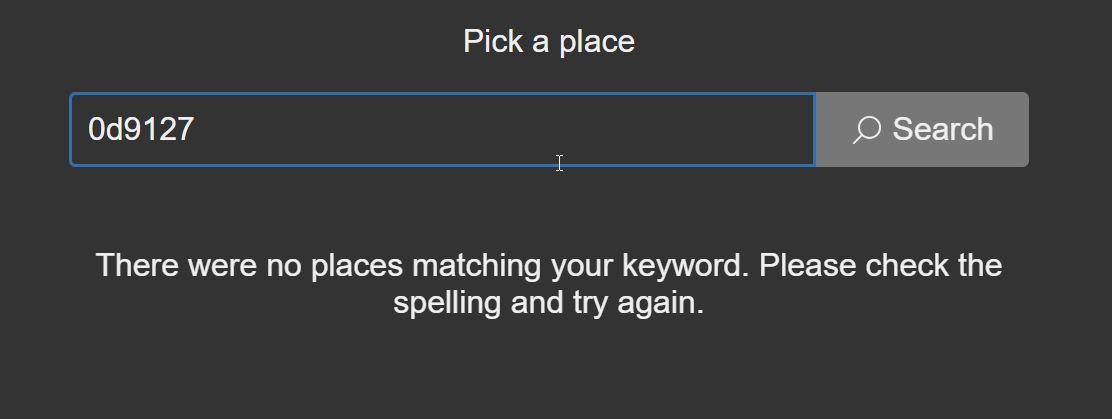
No search results notice
I need to notify the user about the case where the keyword fails to match any known places (empty result set). I start with the markup.
<x-search-results>
    <h4 class="alt-text">Search results</h4>
    <ul></ul>
    <p class="no-results" hidden>
        There were no places matching your keyword. Please check the spelling or try an
        alternative name if it exists.
    </p>
    <!-- .... -->
</x-search-results>
I'm adding a paragraph with the .no-results class and hidden attribute
right after the list. Because of the hidden attribute, the paragraph is
not shown on the page.
The idea here is that I will be able to toggle the hidden attribute on
both this element, and the <ul> element at the same time in order to swap
them out. I don't need to physically take them out of the DOM tree, though.
That would be a more expensive operation, too, although I doubt it would
actually impact UX in this case.
As far as the styling goes, I will only center the text and not much else, for now. To do that, I will need to temporarily remove the hidden attribute, too.
x-search-results .no-results {
    text-align: center;
}
I then restore the hidden attribute. (Don't forget to do this step. The
presence of the attribute represents the initial state of the UI.)
Saving the previously used places
Previously used places is a list of 5 most recently used places. This list is a queue that holds 5 items. After the 5 places are filled up, adding a new place drops the oldest one.
Whenever I'm planning for this type of feature, I first consider whether I can use the DOM to store the state, or I need separate state. There are a few criteria that I need to consider. Will the information be shared by several pieces of code? Will the information need to be converted from one format to another? In this case, I don't share the information with anything, but I do need to convert it (serialize to and deserialize from JSON).
The list in the DOM is updated twice: once when the page loads, and once when any of the items are deleted by the user. And then, the underlying queue is updated only in two cases: once before the user leaves the page after the selection is made, and when an item is deleted from the list.
Given this situation, it will probably better to keep the state in an array, and
duplicate it into the DOM. I would avoid the unnecessary cost of re-creating the
array from the DOM just to save it into localStorage. I'm not concerned about
the cost of having that array in memory as this is a short-lived page and the
array is only 5 items max. For the initial render, I can simply go through the
list item by item and render it out from the template. For deletion, just yank
the item from both the DOM tree and the array, and save the array to
localStorage.
The MPA architecture took some state management right out of the picture. I don't need to worry about keeping the DOM tree in sync if the user is immediately navigating away from thee page.
I'm writing the code to restore the places first. For this, I extract the function that formats the place name first, because I need it to format the place names in the previously used places. Formatting place names within this piece of UI is done the same way everywhere, so I need a single source of truth for that.
customElements.define('x-search', class extends CustomElement {
    setup() {
        // ....

        let formatPlaceName = place => `${place.name}, ${place.admin1}, ${place.country}`,
            updateResultList = results => {
                // ....

                for (let result of results) {
                    // ....
                    label.textContent = formatPlaceName(result)
                    // ....
                }
                // ....
            }

        // ....
    }
})
The code to restore the list requires the stored list data. I'm grabbing that
from localStorage and placing it in a variable. Speaking of variables, I also
add references to the relevant elements on the page.
customElements.define('x-search', class extends CustomElement {
    setup() {
        let previouslyUsedPlaces = JSON.parse(localStorage.previouslyUsedPlaces ?? '[]')

        let input = this.querySelector('[name=search]'),
            // ....
            previouslyUsedPlaceList = this.querySelector('x-previously-used-places ul'),
            previouslyUsedPlaceTemplate = this.querySelector('x-previously-used-places template'),
            // ....

        // ....

        // Restore previously used places
        for (let place of previouslyUsedPlaces) {
            let listItem = previouslyUsedPlaceTemplate.content.cloneNode(true)
            listItem.querySelector('button span').textContent = formatPlaceName(place)
            listItem.querySelector('button').place = place
            listItem.querySelector('button:last-child').place = place
            previouslyUsedPlaceList.append(listItem)
        }

        // ...
    }
})
The code to restore the list is a simple for..of loop. I'm appending the list
items to the live node one by one as soon as I render them, instead of using a
document fragment like I did in the previous part. In this particular
case, I don't need the performance that much, so I'm opting for a simpler
solution that doesn't need two additional steps. It's only 5 items max, so it's
fine. In other words, I don't do cookie-cutter solutions. I prioritize
simplicity, and then if I need performance, I bump the complexity up a notch.
Sometimes the code may contain 3 or 4 different ways of doing the same thing
depending on the context.
In hindsight, I could have added classes or something to the two buttons so that it's easier to differentiate them. The selectors are somewhat flaky and dependent on their exact location within the DOM tree. Since i doubt this part of the UI is going to change that much, I'm going to leave it as is.
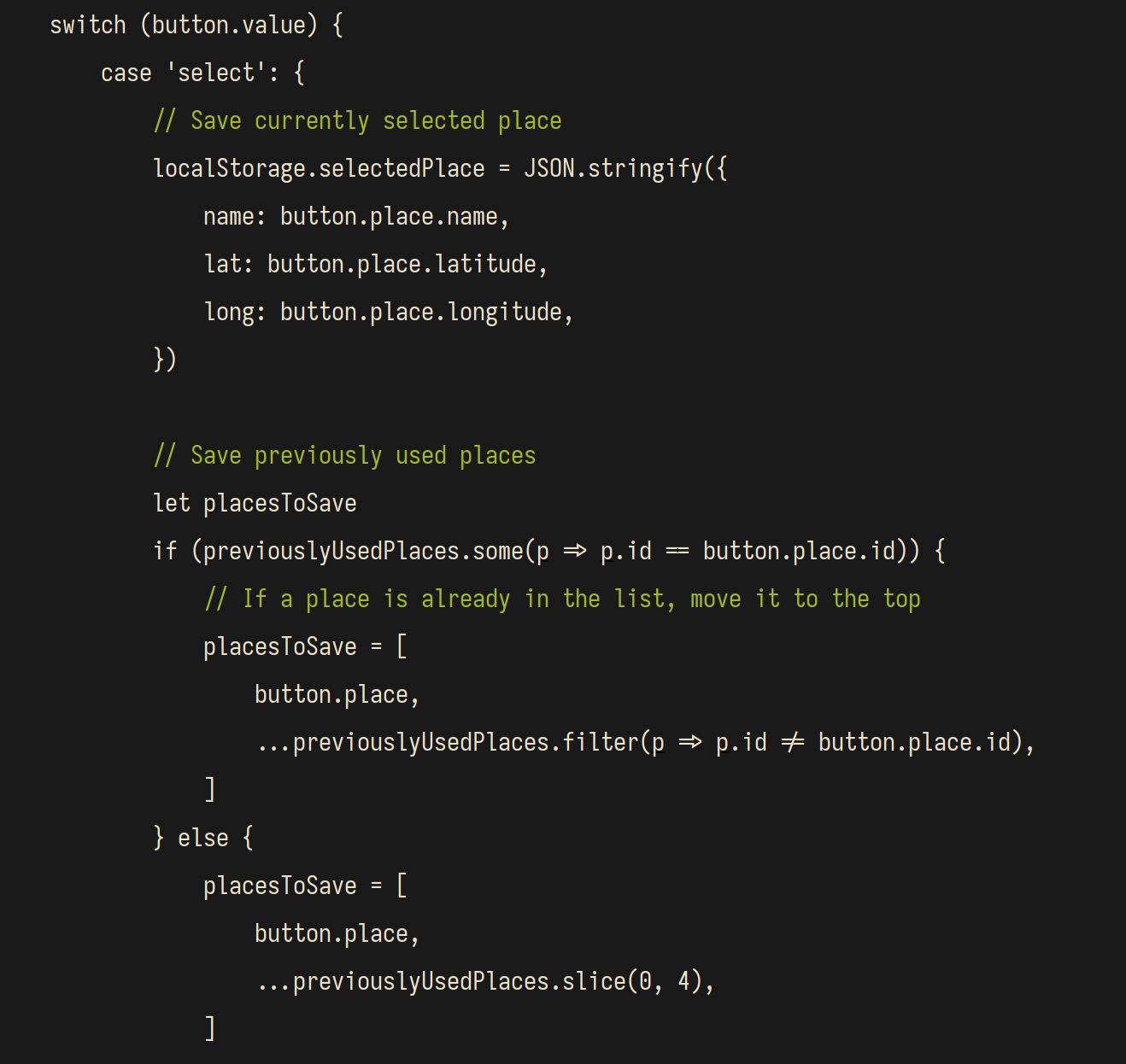
As for the code to save the places, I'm simply adding it do the event listener that handles the place selection. Since that event handler is already doing something, I use comments to segregate the different tasks.
customElements.define('x-search', class extends CustomElement {
    setup() {
        // ....

        searchResultList.onclick = ev => {
            // ....

            // Save currently selected place
            localStorage.selectedPlace = JSON.stringify({
                name: button.place.name,
                lat: button.place.latitude,
                long: button.place.longitude,
            })

            // Save previously used places
            let placesToSave
            if (previouslyUsedPlaces.some(p => p.id == button.place.id)) {
                // If a place is already in the list, move it to the top
                placesToSave = [
                    button.place,
                    ...previouslyUsedPlaces.filter(p => p.id != button.place.id),
                ]
            } else {
                placesToSave = [
                    button.place,
                    ...previouslyUsedPlaces.slice(0, 4),
                ]
            }
            localStorage.previouslyUsedPlaces = JSON.stringify(placesToSave)

            // Go to index page
            location.assign('./')
        }
    }
})
I'm going to be repeating this from time to time. I do not extract functions willy nilly just because I can, or because "it's the right thing to do". There are only three reasons why I'd extract code into functions:
- Reuse
- Reuse
- Reuse
Outside of those reasons, I generally avoid extracting code. I don't say "never do it", but I'd need a pretty good reason to do it. Comments are perfectly fine for making the event listener more readable. It tells you clearly what my intent is, and the rest you should be able to figure out from the code.
In fact, I insist on using comments to organize code so much that I specifically adjusted my IDE's color theme so that comments are one of the rare items that receives syntax highlighting.
Right now I have two named functions extracted within the setup() method.
Those are formatPlaceName() and updateResultList(). Both are used in at
least 2 places.
As far as code-style goes, let me highlight this part:
let placesToSave
if (previouslyUsedPlaces.some(p => p.id == button.place.id)) {
    // If a place is already in the list, move it to the top
    placesToSave = [
        button.place,
        ...previouslyUsedPlaces.filter(p => p.id != button.place.id),
    ]
} else {
    placesToSave = [
        button.place,
        ...previouslyUsedPlaces.slice(0, 4),
    ]
}
In the else branch, you can clearly see that the array could've easily fit
one line. Like this:
let placesToSave
if (previouslyUsedPlaces.some(p => p.id == button.place.id)) {
    // If a place is already in the list, move it to the top
    placesToSave = [
        button.place,
        ...previouslyUsedPlaces.filter(p => p.id != button.place.id),
    ]
} else {
    placesToSave = [button.place, ...previouslyUsedPlaces.slice(0, 4)]
}
Why didn't I do this? It's because it makes comparison between the two branches more difficult. When you keep the general shape of the two branches about the same as in the previous example, you can easily tell the difference (and the common parts).
Switching between the list of results and previously used places
The list of previously used places should only be showing when we are not searching. "When we are not searching" is a bit vague, if you think about it. How do we know the user is not searching? A pragmatic approach is to just say that the user is not searching when the input is empty. This, of course, could also mean that the user cleared it in order to type a new keyword, but it's good enough an approximation.
customElements.define('x-search', class extends CustomElement {
    setup() {
        // ....
        let input = this.querySelector('[name=search]'),
            // ....
            searchResults = this.querySelector('x-search-results'),
            searchResultList = this.querySelector('x-search-results ul'),
            // ....

        // ....
        input.oninput = ev => {
            clearTimeout(input.debounceTimer)
            input.debounceTimer = setTimeout(() => {
                let name = input.value.trim()

                searchResults.hidden = !(previouslyUsedPlaceList.hidden = name)
                // ....
            })
        }
        // ....
    }
})
That's it. I've added a reference to the <x-search-results> element, so
that I can toggle it on and off completely, and I'm toggling it on and off
based on the contents of the input.
I'm noticing a pattern though. I had some very similar code before, as I recall. Here:
noResultsMessage.hidden = !(searchResultList.hidden = !results.length)This pattern basically says "Turn one or the other based on the condition".
Normally, when I'm factoring out a function, I'd do it in the closest common
scope. In this case, that'd be the setup() method of the <x-search> custom
element's class. However, I have good case for this function to be in
common.js instead. First of all, this is very generic functionality. Secondly,
even if I end up using it only on this page (and not the other one), it's not a
large amount of code – practically a one-liner. The chances of this being used
on the other page is also quite high.
// ....

let showLeftOrRight = (left, right, showLeft) => left.hidden = !(right.hidden = showLeft)

// ....

export {
    showLeftOrRight,
    // ....
}
Now I can update the code that was toggling elements:
import {CustomElements, showLeftOrRight} from './common.js'

customElements.define('x-search', class extends CustomElement {
    setup() {
        // ....

        let formatPlaceName = place => `${place.name}, ${place.admin1}, ${place.country}`,
            updateResultList = results => {
                // ....
                showLeftOrRight(searchResultList, noResultsMessage, results.length)
            }

        // ....

        input.oninput = ev => {
            // ....
            input.debounceTimer = setTimeout(() => {
                // ....
                showLeftOrRight(searchResultList, previouslyUsedPlaceList, name)
                // ....
            }, 300)
        }
        // ....
    }
})
Selecting and deleting the previously used places
Selecting a place from the previously used places list is the same as selecting a place from thee search results. It would therefore be great if I could reuse the logic.
Currently, the selection logic is inside a click event listener for the search
results list. I can move the listener to the first common ancestor of both the
search results list and the previously used places list, which is the
<x-places> element.
customElements.define('x-search', class extends CustomElement {
    setup() {
        // ....
        let input = this.querySelector('[name=search]'),
            // ....
            places = this.querySelector('x-places'),

        // ....
        places.onclick = ev => {
            let button = ev.target.closest('button')
            if (!button) return

            // ...
        }
    }
})
Before, I could make an assumption that clicks coming from any button can be
treated as attempted selection. I can no longer make that assumption because I
also have a button to delete a place. To differentiate between these actions, I
can add a value attribute to all buttons, and give them different values
depending on their role. This I can do in the places.html. For example:
<button value="select">
    <x-icon name="favorite"></x-icon>
    <span></span>
</button>
<button value="delete">
    <x-icon name="delete"></x-icon>
    <span class="alt-text">Delete</span>
</button>
Remember earlier how I said something about using somewhat flaky selectors, and them left them as is "for now"? Well, now I can do better thanks to the value attributes.
listItem.querySelector('button[value=select] span').textContent = formatPlaceName(place)
listItem.querySelector('button[value=select]').place = place
listItem.querySelector('button[value=delete]').place = place
Finally, I use switch to select the appropriate branch depending on thee button's value attribute.
switch (button.value) {
    case 'select': {
        // .... Code that was previously in the listner ....
        break
    }
    case 'delete': {
        button.closest('li').remove()
        previouslyUsedPlaces.splice(previouslyUsedPlaces.findIndex(p => p.id == button.place.id), 1)
        localStorage.previouslyUsedPlaces = JSON.stringify(previouslyUsedPlaces)
        break
    }
    default:
        console.warn(`Invalid value attribute ${button.value}`)
}
If you look carefully, you'll notice that I use curly braces around the
statements for each case clause. This may be unusual, but it's totally
valid, and intentional. When I have longer cases, I like to put braces
around them for two reasons:
- It makes it possible to fold the block in my IDE, which helps navigation within the code.
- It allows me to recycle variable names across branches if needed as they are contained within their own blocks.
As for why I use switch rather than extract a couple of functions, it is because I believe switch makes the available options the most evident without creating some kind of indirection (e.g., a map that is then looked up somewhere else), and it also keeps related code close to each other making comparisons easier – by now you've probably figured out I find the ability to quickly compare things very important for readability.
You may not have noticed this, but by reusing the code I used for search results, I'm also triggering the code that saves the selected place as the last-used place. This has the desired side-effect of moving the previously used place to the top of the list when it is selected again.
I'm testing this and I'm generally happy. Well, maybe note quite happy, but it's getting late so I'm wrapping this up.
Payload sizes and all that
The current tally looks like this:
- 19 lines of code in
common.js - 108 lines in
places.js - Total 4.9KB of JavaScript
Do you see now why I wouldn't build? For instance, the Google.com homepage needs 893KB of JavaScript. I can pack about 200× more code into this page before I match that amount of code still without building. 200× more features (roughly) before it matches the fully built and optimized code from the Google homepage. So, I don't really see why I'd actually need to build ever.
You can grab the code for the current version and check it out.
Conclusion
The place selection page is now complete. Hooray! This means that in the next part, I'm finally going to start working on the weather forecast.